 Microsoft Dynamics 365 Supply Chain Management
What Dynamics 365 Warehouse Slotting Actually Does (And What It Doesn't)

Dynamics 365 Supply Chain Management ships a feature called Warehouse slotting. If you run a warehouse on it, you have probably assumed that feature works out where your inventory should live. It does not. It decides how to fill the locations you have already chosen.
No cost, no obligation.
That is not a criticism. It is a distinction, and it is worth understanding before you plan any slotting work, because it changes what tool you reach for.
I build AI systems inside Dynamics 365, and I keep finding this same gap underneath problems people hire me to solve. Someone wants their pickers to walk less. The conversation turns to the Warehouse slotting feature. And then we read what the feature actually does, together, from Microsoft's own documentation. This article is that reading.
BP-4471
Brake pads
Aisle 14
412 picks
OF-1180
Oil filters
Aisle 12
388 picks
WB-2203
Wiper blades
Aisle 09
341 picks
SP-8890
Spark plugs
Aisle 16
297 picks
AF-3312
Air filters
Aisle 07
234 picks
BT-5540
Batteries
Aisle 15
198 picks
CB-6021
Cabin filters
Aisle 04
143 picks
HL-7734
Headlamps
Aisle 11
96 picks
RD-9012
Radiator caps
Aisle 02
61 picks
TB-1145
Timing belts
Aisle 06
44 picks
FL-2210
Fuel lines
Aisle 03
38 picks
GK-4408
Gasket sets
Aisle 08
12 picks
Start with the words Microsoft uses
Here is how Microsoft describes the feature, verbatim:
"The Warehouse slotting feature lets you consolidate demand by item and unit of measure from orders that have a status of Ordered, Reserved, or Released."
Read the three order statuses. Ordered. Reserved. Released. Every one of them is an open order, sitting in front of the warehouse right now.
What it reads
- Ordered
- Reserved
- Released
What it does not read
- Order history
- Seasonality
- Velocity trend
That tells you what the feature looks at. It looks at the work in front of you. It does not look at your order history. There is no year of past orders feeding into it, no analysis of what tends to get picked together, no seasonality, no velocity trend. It reads the demand you have not yet fulfilled and it plans how to stage inventory to fulfil it.
The criteria it uses to assign a location confirm this. They are Assume empty, Consider qty, and Consider on-hand. Those are questions about capacity and occupancy. Does the location have room. How much is there already. They are not questions about distance, or about how often the item is picked, or about what else it ships alongside.
What the feature produces is a replenishment plan. It gets the right quantity of the right item into the pick faces you defined, ahead of the wave. That is genuinely useful.
It is just not the same thing as deciding where the item should live in the first place.
The location directives tell the same story
If you want to see this from another angle, look at location directives, which are the rules that steer where work is directed. There are eleven strategies you can choose from:
- 1None
- 2Match packing quantity
- 3Consolidate
- 4Consolidate including incoming work
- 5FEFO batch reservation
- 6Round up to the full license plate and FEFO batch
- 7Round up to a full license plate
- 8License plate guided
- 9Empty location with no incoming work
- 10Location aging FIFO
- 11Location aging LIFO
Read the whole list. Not one of them is based on distance, travel, or how fast an item moves. When the documentation talks about finding the "optimal location," it means the location that satisfies your constraints. Does it fit. Is it empty. Is the batch right.
Optimal here means valid. It does not mean close.
Again, this is the system doing exactly what a system of record should do. It executes the policy you gave it. It was never designed to work out what that policy should have been.
"But you can configure velocity slotting yourself"
If you know the product well, you are already forming the objection, so let me put it on the table before you do.
You can, in fact, steer slotting toward faster movers. The slotting template lines carry a query over your locations, and location directives carry their own queries. So if you maintain an ABC classification or a velocity field on your products, you can filter on it and push your A items forward. People do this, and it works.
Here is the honest distinction, and it is the whole point. Dynamics will neither compute that ranking for you nor decide the assignment. It executes a policy that a human derived somewhere else. In practice, that somewhere else is a spreadsheet. Someone exports order lines, builds a pivot table, ranks the SKUs, decides the moves, and types the result back into the system as a fixed policy.
The manual loop
- exports order lines
- builds a pivot table
- ranks the SKUs
- decides the moves
- types the result back … as a fixed policy
That is real work, and it produces real results. But it is a point in time. Order profiles drift. The classification you loaded in March is describing a warehouse that no longer exists by September, and nobody has time to redo it monthly by hand.
The system holds the policy faithfully. It does not know the policy has gone stale.
What the newer features add, and what they do not
Microsoft has been investing here, and it is worth being precise about what has arrived, because the marketing language and the feature detail say different things and you should read both.
There is a preview capability called warehouse spatial location. It lets you assign X, Y and Z coordinates to your locations, and it can sequence picking work by actual travel distance. That is a real advance. But read what it does: it sequences the trip between locations you already chose. It makes the walk shorter. It does not decide where the item lives, and it is still in preview, which Microsoft labels as not for production use. Coordinates are also entered by hand, location by location.
There is also a feature called dynamic item placement. Microsoft's business value paragraph says the system "intelligently balances inventory during inbound processes, ensuring optimal placement," and the release overview mentions "AI-driven inventory rebalancing." That sounds like the gap being closed. Then read the feature detail paragraph directly below it: "Define preferred storage locations and target quantities for each item, either by editing directly or importing data at scale."
Read the verb. Define. By editing, or by importing. Both paragraphs are accurate. They answer different questions. The first tells you what the outcome feels like. The second tells you who decides. Somebody still works out what the preferred locations should be.
Warehouse spatial location
PreviewWhat it does
- Sequences the trip between locations you already chose, by actual travel distance.
- Makes the walk shorter.
What it does not do
- Decide where the item lives.
- Leave preview status — Microsoft labels it not for production use.
- Enter coordinates for you. They are entered by hand, location by location.
Dynamic item placement
What it does
- Intelligently balances inventory during inbound processes, ensuring optimal placement.
- Gives you a way to define preferred storage locations and target quantities, by editing or importing data at scale.
What it does not do
- Work out what the preferred locations should be.
- Make the decision.
"...intelligently balances inventory during inbound processes, ensuring optimal placement..."
"AI-driven inventory rebalancing."
"Define preferred storage locations and target quantities for each item, either by editing directly or importing data at scale."
The feature gives you a better way to enter that decision. It does not make the decision.
The gap, stated plainly
Put it together and the shape is clear. Dynamics 365 will stage inventory to meet open demand, sequence a picker's trip, and faithfully hold a placement policy you give it. What it will not do is read your order history and work out, on its own and on a schedule, where each item should live so that the orders you actually ship are cheapest to fill.
What Dynamics 365 does
- Stages inventory to meet open demand
- Sequences a picker's trip
- Faithfully holds a placement policy you give it
What stays manual
Read your order history and work out, on its own and on a schedule, where each item should live so that the orders you actually ship are cheapest to fill.
That decision, the one that drives how far your people walk, is the one part of this that stays manual. It is the spreadsheet that goes out of date.
I have not found a product positioned to close that specific gap for Dynamics 365 Finance and Operations. If one exists, I would genuinely like to see it, because it is the piece that matters most. Slotting analysis is not glamorous and it does not demo well, which is probably why it gets left to a quarterly exercise. But it is the difference between a picker who makes rate and one who cannot, and it is measured in the number that actually sits on a warehouse manager's scorecard: lines picked and shipped per person hour.
A note on the statistic everyone quotes
You will have heard that travel is roughly half of a picker's time. It is a fair rule of thumb and I use it too. It is worth knowing where it comes from, though, because the whole industry repeats it as if it were a study. It traces to Edward Frazelle's book World-Class Warehousing, published in 1996 through his own consultancy. There is no disclosed sample or methodology behind the figure. It is directionally right, and it is a consultant's estimate, not a measurement. If you are going to build a business case on a number, it is worth knowing which kind of number it is.
There is no disclosed sample or methodology behind the figure.
a consultant's estimate, not a measurement
Where this leaves you
If you are planning slotting work on Dynamics 365, the useful conclusion is this. The platform will execute placement well. It will not derive placement for you. So the first question is not which feature to turn on. It is who is deciding where your inventory lives, how often they revisit it, and whether the answer is still a spreadsheet from two quarters ago.
Questions to answer
- 1who is deciding where your inventory lives
- 2how often they revisit it
- 3whether the answer is still a spreadsheet from two quarters ago
That is a question you can answer this week, with data you already have.
Find out what your placement is costing you.
Not sure how to pull the data? How to export order lines from Dynamics 365.





Common questions
Looking for an answer?
Warehouse pick optimization is the practice of arranging inventory and organizing picking work so that workers travel less when filling orders. It covers where products are stored (slotting), which orders are picked together (batching), and the path a picker takes (routing). Slotting is usually the highest-leverage of the three because it removes travel rather than shortening it.
Because the items on a typical order are stored in different places, and where each item was placed was usually decided once, when it first arrived, based on what space was free at the time. As demand changes, those placements go out of date, but the shelves stay where they are. The travel cost grows quietly and continuously.
Dynamics 365 Supply Chain Management manages warehouse locations, inventory, and picking work, and it executes those processes reliably. It is a system of record, and it is not designed to analyze a year of order history and re-derive where inventory should be placed. That analysis sits on top of the ERP and writes its results back into it.
Some common signals: pickers regularly walk long distances for small orders, items that are frequently ordered together are stored far apart, your fastest-moving products are not near the packing area, and nobody has reviewed storage locations since the warehouse was set up. If your product mix has changed meaningfully since then, the placement is almost certainly out of date.
Two things. Twelve months of order lines if you have them, ninety days is enough to start (order number, item, quantity, date), and a location master showing which item is stored where. Both are standard exports from any ERP or warehouse management system. No production access is required.
You reconstruct the trips implied by real historical orders against the current storage layout, then compare that against the trips those same orders would have required under a better layout. The difference is the waste, and it can be expressed in distance, time, or labor cost.
Cube-per-order index, or COI, ranks each product by its physical volume divided by how often it is ordered. Items with a low COI, meaning small and frequently ordered, belong closest to the packing area. It is a classic slotting method dating to the 1960s and it remains a sound starting point.
Usually because updating it is harder than not updating it. If recording a move takes several steps in a system people find slow or awkward, those moves stop being recorded, and the data drifts from reality. This matters a great deal, because optimizing placement using inaccurate location data produces confident, wrong answers. Location accuracy has to be fixed first.
No. Placement analysis sits alongside the system you already run. It reads order history, works out where inventory should be, and writes the recommended locations back. Your team keeps working in the same system.
No, and you should not. In most operations a small proportion of products accounts for the majority of picking activity. Moving those captures most of the available benefit. Recommendations should always be ranked by value so you can stop at whatever point the effort stops being worth it.
Read next
Each question this article raises is answered at length somewhere in the cluster below.
- What is warehouse slotting?
- Should I optimize slotting or picker routing first?
- What location directives actually decide in Dynamics 365
- Does warehouse spatial location do slotting?
- Dynamic item placement, read line by line
- ABC analysis: dollars or picks?
- Why a slotting saving has to be net of restock
- Where the travel statistic comes from
- Who can help with Dynamics 365 slotting?
- Exporting order lines from Dynamics 365
How the method works, in detail
Each step of the approach is written up on its own — the data it needs, the arithmetic, and where it stops being worth doing.

The walking is the cost: pick-path and slotting optimization for Dynamics 365 warehouses
Travel is roughly half of order-picking time, and your ERP records every move without ever optimizing it. Here's how pick-path and slotting optimization on Dynamics 365 cuts the walking.
Read more3 min read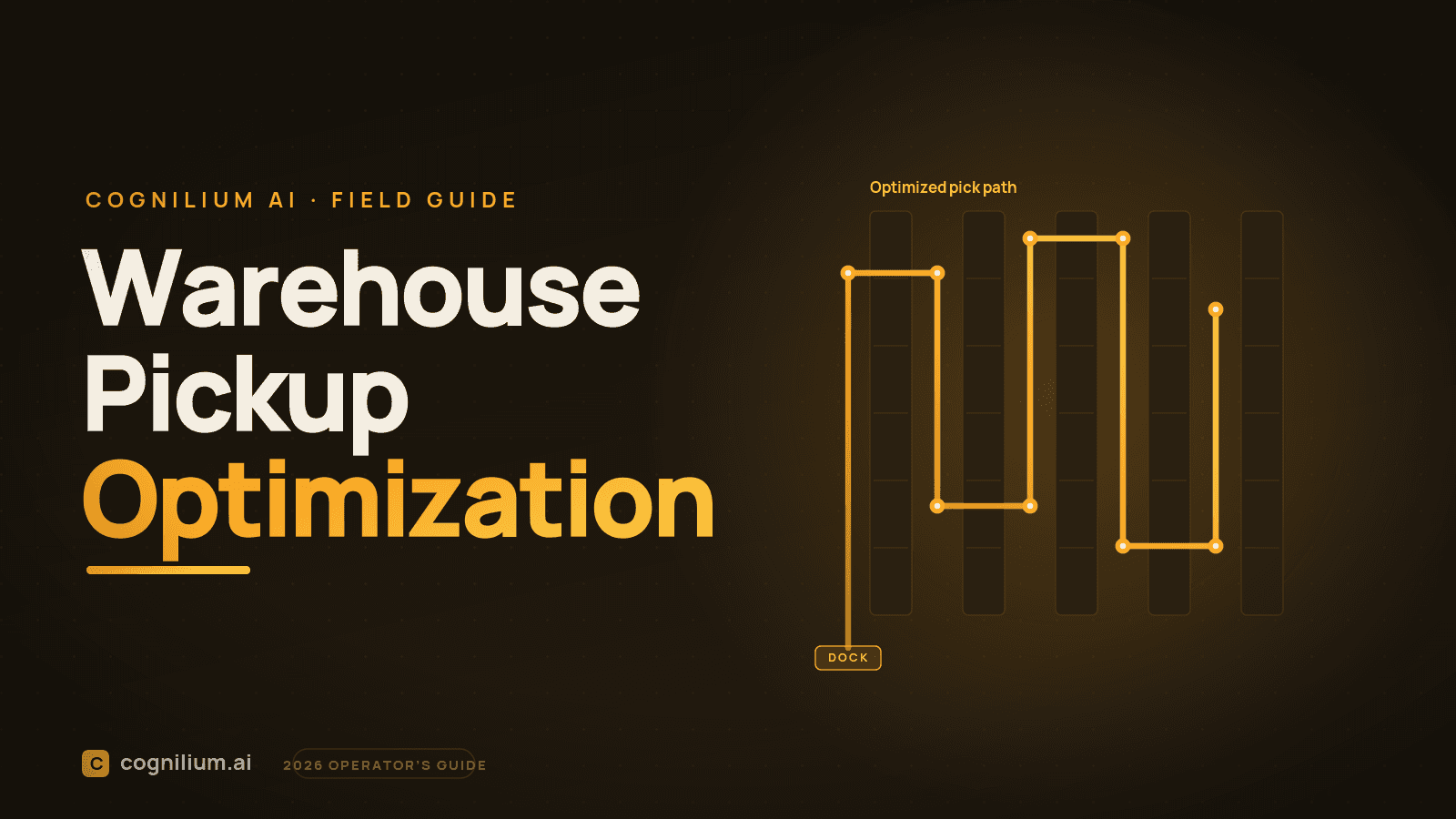
Warehouse Pickup Optimization: The Operator's Guide (2026)
Pick optimization is five layers, and most warehouses fix the last one first. Why slotting beats routing, why location accuracy gates everything, plus the ROI math.
Read more10 min read
Where Does the '50% of Picking Time Is Travel' Statistic Actually Come From?
The most-quoted number in warehousing is that travel is half of a picker's time. It is not from a study. It traces to a self-published 1996 consultant book. Here is the full chain.
Read more3 min read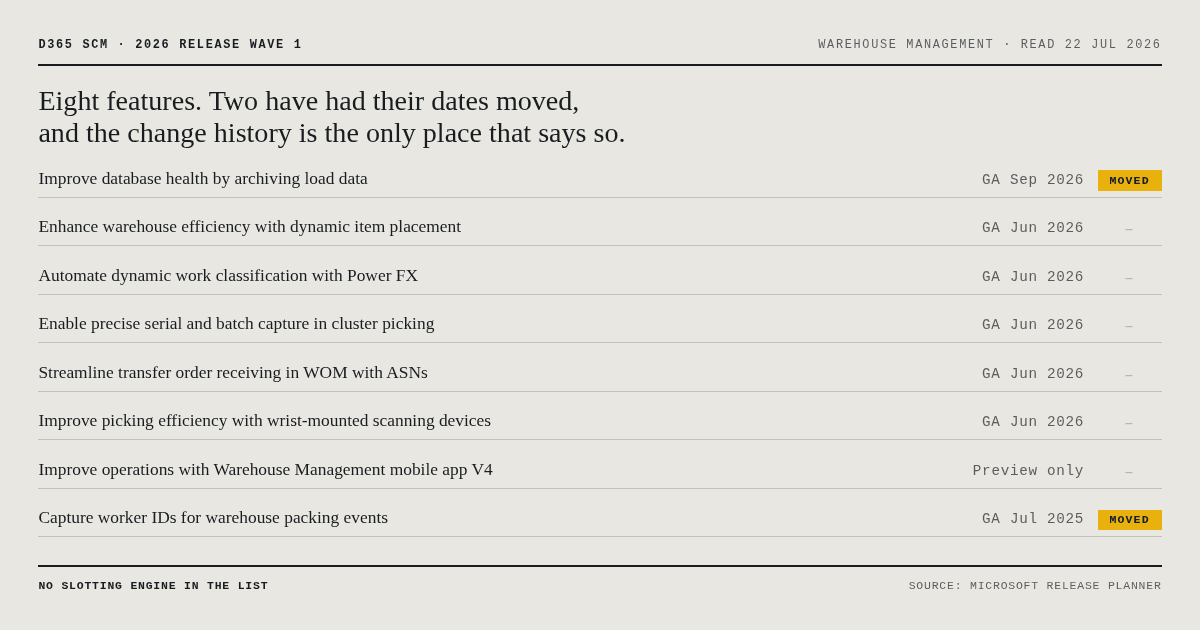
What Is in Dynamics 365 2026 Release Wave 1 for Warehouse Management? The Full List
Every one of the eight warehouse management features in the D365 2026 wave 1 plan, read off the Release Planner with both paragraphs, its dates and its change history. Including the one that archives the work tables your picking analysis needs.
Read more16 min read
Who Can Help With Pick Optimization in Dynamics 365?
If you run warehouses on Dynamics 365 and your pickers walk too far, here is who actually solves this, what to look for, and the questions that separate real help from a sales pitch.
Read more4 min read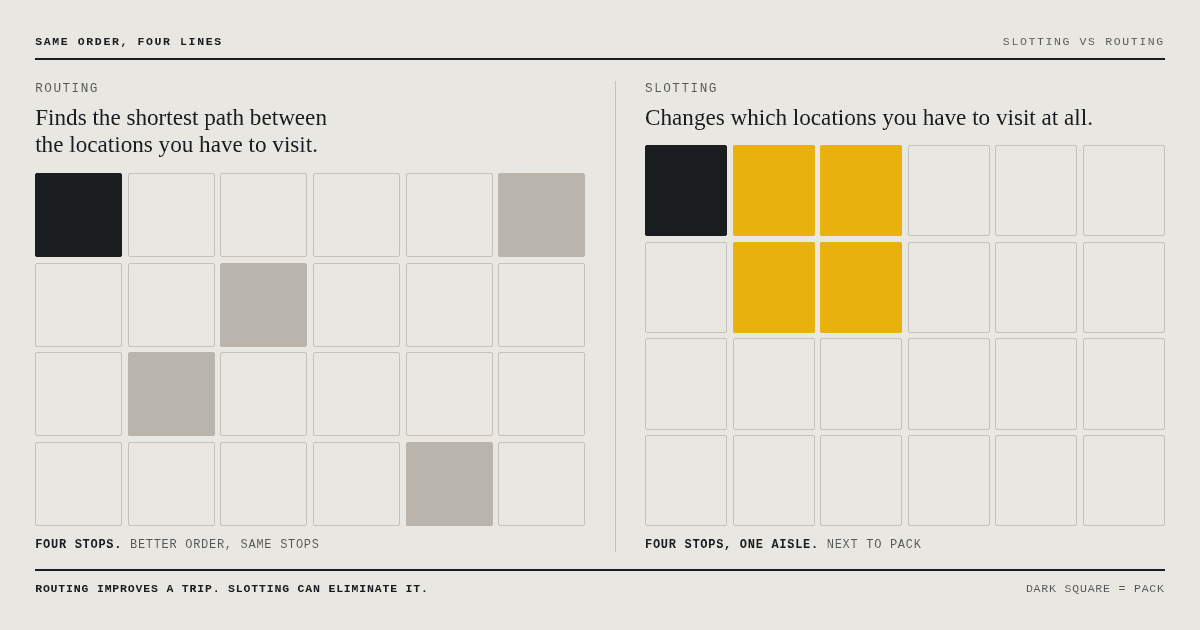
What Is Warehouse Slotting, and Should You Fix It Before Routing?
Slotting decides which location each product occupies. Routing shortens a trip; slotting removes it. Which one wins depends on your lines per order. The difference, the arithmetic including the replenishment cost nobody nets off, and what has to be true first.
Read more16 min read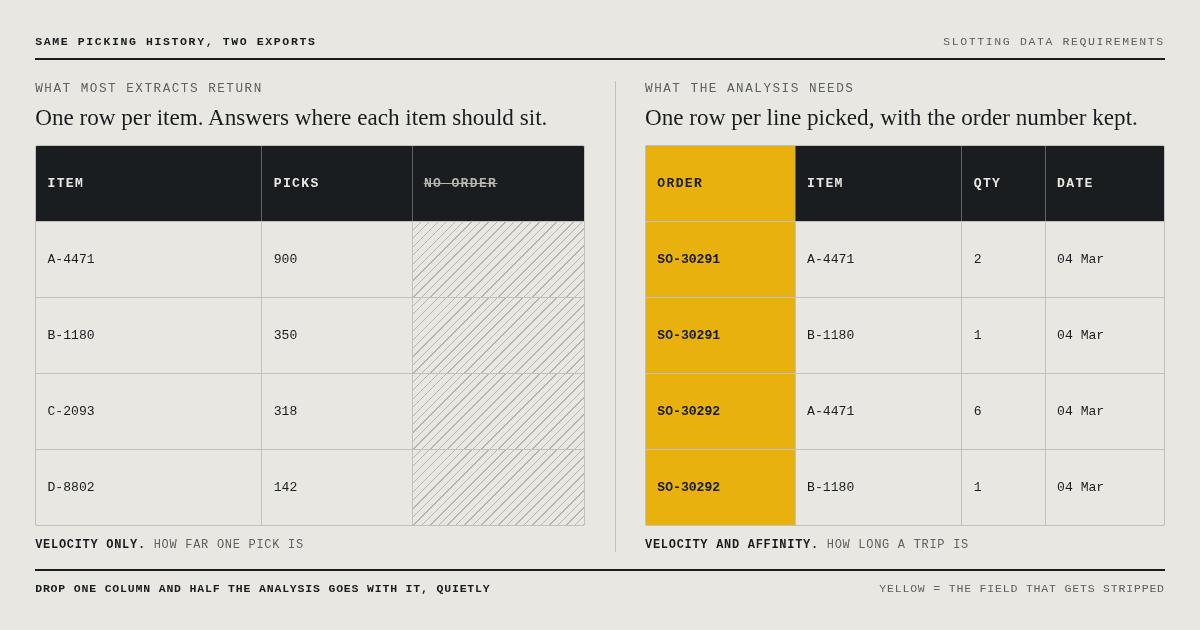
What Data Do You Need for a Warehouse Slotting Analysis?
A slotting analysis needs five things. Four of them are easy. The fifth gets quietly stripped out of most exports, and when it goes, half of what the analysis could have found goes with it, without anyone noticing.
Read more19 min read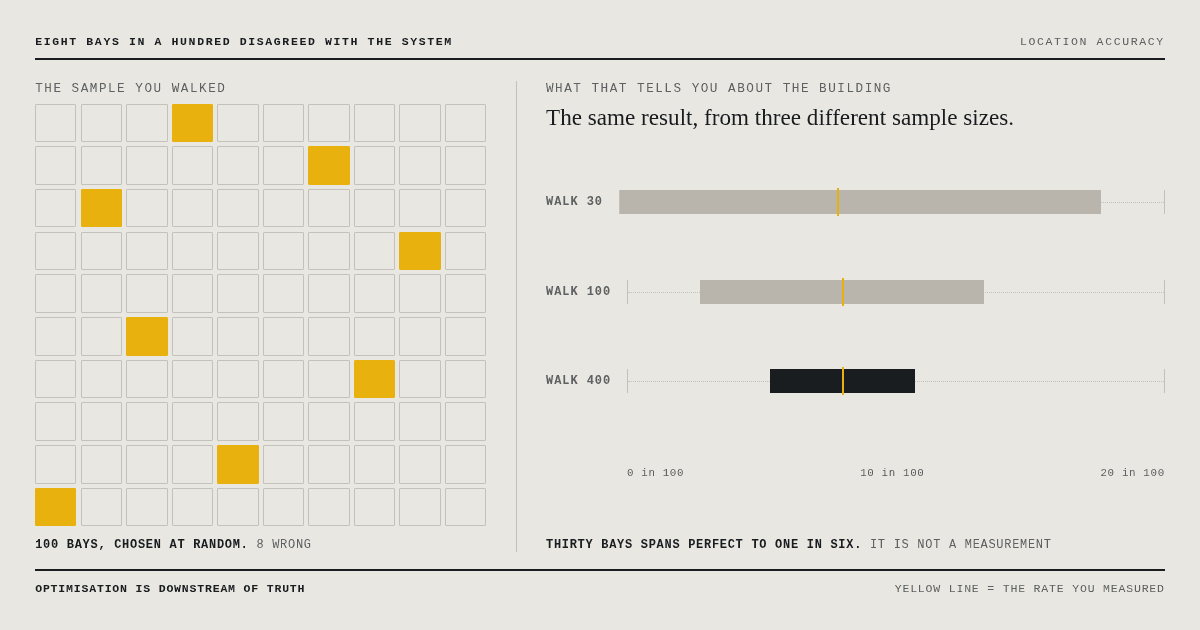
How Do You Know Your Warehouse Location Data Is Right?
Every placement analysis compares where things are against where they should be. If the first half of that comparison is wrong, the analysis does not fail loudly. It produces confident, specific, wrong answers in a format that looks authoritative enough to act on.
Read more18 min read