Back to Blog
Published:
Last Updated:
Fresh Content

Multi-Agent Orchestration on AWS: LangGraph vs CrewAI vs Native

11 min read
2,200 words
high priority
M

Muhammad Mudassir

Founder & CEO, Cognilium AI

Compare LangGraph, CrewAI, and native AgentCore for multi-agent systems on AWS. When to use each, architecture patterns, and production deployment code.
LangGraph AWSCrewAI productionmulti-agent systemsagent orchestration patternsAWS Bedrock multi-agentagent coordination

Single agents hit walls. Complex tasks need specialized agents working together—a planner, a researcher, an executor, a validator. But how do you orchestrate them? LangGraph offers stateful workflows. CrewAI provides role-based collaboration. Native AgentCore keeps it simple. Here's when to use each.

What is Multi-Agent Orchestration?

Multi-agent orchestration is the coordination of multiple specialized AI agents to complete complex tasks. Instead of one agent doing everything, specialized agents handle specific responsibilities (research, planning, execution, validation) and pass context between each other. The orchestration layer decides which agent handles what, manages shared state, and aggregates final outputs.

When You Need Multi-Agent Systems

Single agents work fine for:

  • Simple Q&A
  • Straightforward tasks with clear inputs/outputs
  • Conversations that don't require specialized knowledge

Multi-agent systems shine when:

✅ Task Requires Different Expertise

User: "Research AI agent trends, draft a blog post, and schedule it for Tuesday"

Single agent: Tries to do everything, quality suffers

Multi-agent:
  → Research Agent: Gathers latest AI agent news
  → Writer Agent: Drafts post based on research
  → Scheduler Agent: Publishes to CMS for Tuesday

✅ Quality Requires Validation

User: "Analyze this contract for risks"

Single agent: Analyzes, may miss things

Multi-agent:
  → Analyzer Agent: Identifies potential risks
  → Validator Agent: Double-checks analysis
  → Compliance Agent: Verifies regulatory alignment

✅ Workflow Has Conditional Branches

User: "Help me plan a trip"

Multi-agent:
  → Planner Agent: Creates itinerary
  → IF budget < $1000 → Budget Agent: Finds deals
  → IF international → Visa Agent: Checks requirements
  → Booking Agent: Reserves based on approved plan

The Three Approaches

FrameworkBest ForComplexityControl
LangGraphComplex state machines with conditionalsHighMaximum
CrewAIRole-based teams with natural collaborationMediumModerate
Native AgentCoreSimple routing, minimal overheadLowBasic

LangGraph: Stateful Workflows

LangGraph treats agent orchestration as a state machine. You define nodes (agents), edges (transitions), and conditions (when to branch).

When to Use LangGraph

✅ Complex workflows with many conditional branches ✅ Need to loop back to previous steps ✅ State must be explicitly managed and inspected ✅ Debugging requires full workflow visibility

Architecture

Architecture Diagram

Implementation

from langgraph.graph import StateGraph, END
from typing import TypedDict, Annotated
import operator

# Define state schema
class AgentState(TypedDict):
    messages: Annotated[list, operator.add]
    research_data: str
    analysis: str
    draft: str
    validation_passed: bool

# Define agent nodes
def research_agent(state: AgentState) -> AgentState:
    # Call Bedrock for research
    research = call_bedrock(
        model="anthropic.claude-3-sonnet",
        prompt=f"Research: {state['messages'][-1]}"
    )
    return {"research_data": research}

def analysis_agent(state: AgentState) -> AgentState:
    analysis = call_bedrock(
        model="anthropic.claude-3-sonnet",
        prompt=f"Analyze this research: {state['research_data']}"
    )
    return {"analysis": analysis}

def draft_agent(state: AgentState) -> AgentState:
    draft = call_bedrock(
        model="anthropic.claude-3-sonnet",
        prompt=f"Draft content based on: {state['analysis']}"
    )
    return {"draft": draft}

def validation_agent(state: AgentState) -> AgentState:
    validation = call_bedrock(
        model="anthropic.claude-3-haiku",  # Cheaper model for validation
        prompt=f"Validate this draft for accuracy: {state['draft']}"
    )
    passed = "APPROVED" in validation
    return {"validation_passed": passed}

# Define conditional edges
def should_revise(state: AgentState) -> str:
    if state["validation_passed"]:
        return "end"
    return "draft"  # Loop back to revise

# Build graph
workflow = StateGraph(AgentState)

workflow.add_node("research", research_agent)
workflow.add_node("analyze", analysis_agent)
workflow.add_node("draft", draft_agent)
workflow.add_node("validate", validation_agent)

workflow.add_edge("research", "analyze")
workflow.add_edge("analyze", "draft")
workflow.add_edge("draft", "validate")
workflow.add_conditional_edges("validate", should_revise, {"end": END, "draft": "draft"})

workflow.set_entry_point("research")

# Compile and run
app = workflow.compile()
result = app.invoke({"messages": ["Write about AI agent trends"]})

Pros & Cons

ProsCons
Full control over workflowSteeper learning curve
Explicit state managementMore boilerplate code
Easy to visualize and debugOverkill for simple tasks
Supports complex branchingState schema must be defined upfront

CrewAI: Role-Based Collaboration

CrewAI treats agents as team members with roles. You define who does what, and the framework handles collaboration.

When to Use CrewAI

✅ Tasks map naturally to human roles (researcher, writer, editor) ✅ Want agents to "discuss" and iterate naturally ✅ Less concerned with exact workflow order ✅ Rapid prototyping of multi-agent ideas

Architecture

Architecture Diagram

Implementation

from crewai import Agent, Task, Crew
from langchain_aws import ChatBedrock

# Initialize Bedrock LLM
llm = ChatBedrock(
    model_id="anthropic.claude-3-sonnet-20240229-v1:0",
    region_name="us-east-1"
)

# Define agents with roles
researcher = Agent(
    role="Senior Research Analyst",
    goal="Find accurate, current information on the given topic",
    backstory="You're an expert researcher with 10 years experience in tech analysis.",
    llm=llm,
    verbose=True
)

writer = Agent(
    role="Content Writer",
    goal="Create engaging, well-structured content based on research",
    backstory="You're a skilled writer who translates complex topics into readable content.",
    llm=llm,
    verbose=True
)

editor = Agent(
    role="Editor",
    goal="Ensure content is accurate, clear, and publication-ready",
    backstory="You're a meticulous editor who catches errors and improves clarity.",
    llm=llm,
    verbose=True
)

# Define tasks
research_task = Task(
    description="Research the latest trends in AI agents for 2025",
    expected_output="A comprehensive summary of key trends with sources",
    agent=researcher
)

writing_task = Task(
    description="Write a 1000-word blog post based on the research",
    expected_output="A polished blog post in markdown format",
    agent=writer
)

editing_task = Task(
    description="Review and improve the blog post for publication",
    expected_output="Final edited blog post ready for publishing",
    agent=editor
)

# Create and run crew
crew = Crew(
    agents=[researcher, writer, editor],
    tasks=[research_task, writing_task, editing_task],
    verbose=True
)

result = crew.kickoff()
print(result)

Pros & Cons

ProsCons
Intuitive role-based designLess control over exact workflow
Natural collaboration patternsHarder to debug agent interactions
Quick to prototypeCan be unpredictable in complex scenarios
Good abstractions"Magic" can obscure what's happening

Native AgentCore: Simple Routing

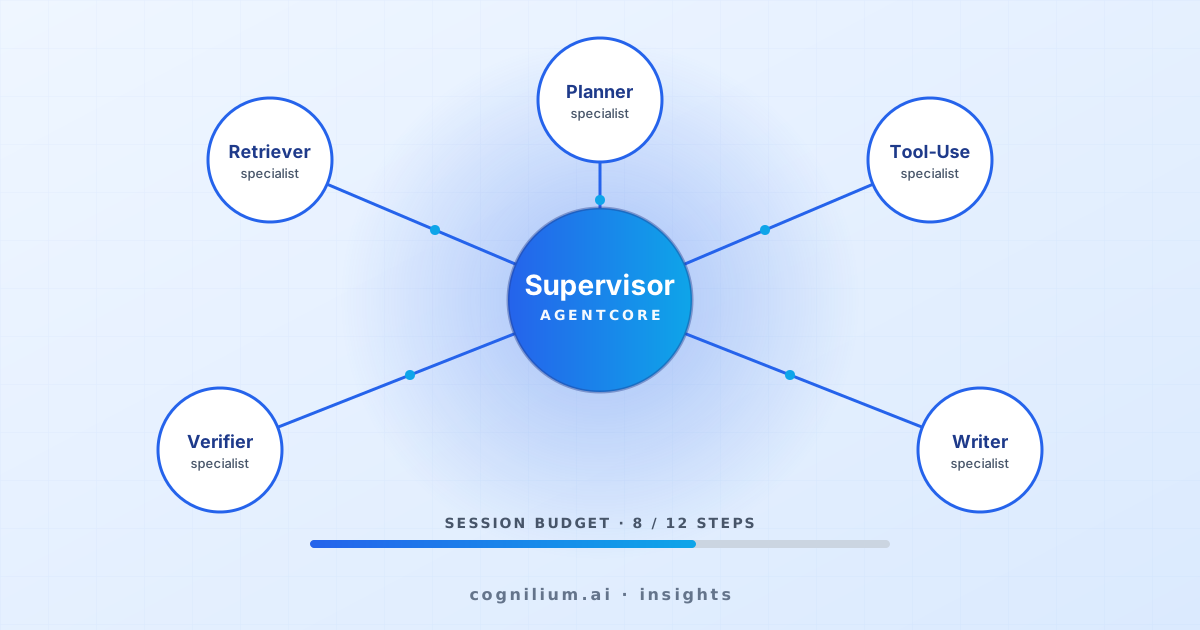
Native AgentCore uses a router pattern. A central router decides which specialist agent handles each request.

When to Use Native

✅ Simple routing based on query type ✅ Minimal dependencies preferred ✅ Each agent is independent (no collaboration needed) ✅ Production stability over flexibility

Architecture

Architecture Diagram

Implementation

from bedrock_agentcore import Agent, Router

# Define specialist agents
finance_agent = Agent(
    name="FinanceAgent",
    model="anthropic.claude-3-sonnet",
    system_prompt="You are a financial advisor. Help with budgets, investments, and money."
)

support_agent = Agent(
    name="SupportAgent",
    model="anthropic.claude-3-haiku",  # Cheaper for simple queries
    system_prompt="You are a support agent. Help with product questions and issues."
)

sales_agent = Agent(
    name="SalesAgent",
    model="anthropic.claude-3-sonnet",
    system_prompt="You are a sales agent. Help with pricing, demos, and purchasing."
)

# Define router
router = Router(
    agents=[finance_agent, support_agent, sales_agent],
    routing_strategy="classifier",  # Use LLM to classify intent
    routing_model="anthropic.claude-3-haiku",
    fallback_agent=support_agent
)

# Route and respond
response = router.route_and_respond(
    message="What's the pricing for the enterprise plan?",
    session_id="user-123"
)
# → Routed to SalesAgent

Pros & Cons

ProsCons
Simple to understandNo agent collaboration
Minimal dependenciesRouter can misclassify
Production-stableLimited to single-agent responses
Easy to debugNo complex workflow support

Head-to-Head Comparison

DimensionLangGraphCrewAINative AgentCore
ComplexityHighMediumLow
ControlMaximumModerateBasic
CollaborationExplicit via stateNatural via rolesNone (routing only)
DebuggingExcellent (state visible)ModerateSimple
Learning CurveSteepModerateMinimal
Best ForComplex workflowsRole-based teamsSimple routing
AWS IntegrationGoodGoodNative
Production ReadinessHighModerateHigh

Decision Framework

Choose LangGraph When:

□ Workflow has 5+ steps with conditionals
□ Need to loop back or retry steps
□ State must be explicitly tracked and inspected
□ Team has graph/workflow modeling experience
□ Debugging complex agent interactions is priority

Choose CrewAI When:

□ Task maps to human team roles naturally
□ Want agents to "discuss" and refine
□ Rapid prototyping is priority
□ Less concerned with exact control flow
□ Building proof-of-concept quickly

Choose Native AgentCore When:

□ Simple routing based on intent
□ Each agent is independent
□ Want minimal dependencies
□ Production stability is priority
□ Team prefers explicit, simple code

Production Example: VectorHire

At Cognilium, our VectorHire product uses 4 parallel agents for candidate processing:

Architecture

Architecture Diagram

Why We Chose This Pattern

  • Parallel execution: All 4 agents run simultaneously
  • Specialization: Each agent optimized for one task
  • Aggregation: Coordinator combines results
  • Speed: 4x faster than sequential processing

Results

MetricSingle AgentMulti-Agent
Processing time12s3.2s
Accuracy87%94%
Cost per candidate$0.08$0.05

The multi-agent approach is faster, more accurate, AND cheaper.

Common Orchestration Mistakes

Mistake 1: Over-Engineering Simple Tasks

# ❌ 5 agents for a simple Q&A
Researcher → Analyzer → Drafter → Validator → Publisher

# ✅ Single agent is fine
QAAgent

Mistake 2: No Fallback Strategy

# ❌ Crashes if routing fails
agent = router.route(message)
response = agent.respond(message)

# ✅ Has fallback
agent = router.route(message) or fallback_agent
response = agent.respond(message)

Mistake 3: Ignoring Agent-to-Agent Latency

Architecture Diagram

Mistake 4: No Shared Memory

# ❌ Each agent has isolated context
agent1.respond(message)  # Knows about message
agent2.respond(message)  # Doesn't know what agent1 said

# ✅ Shared memory layer
memory = SharedMemory(session_id="123")
agent1.respond(message, memory=memory)
agent2.respond(message, memory=memory)  # Has full context

Getting Started

Quick Start: Native Routing

pip install bedrock-agentcore
agentcore init multi-agent-demo
# 10 lines to multi-agent routing
from bedrock_agentcore import Agent, Router

agents = [
    Agent(name="Sales", model="claude-3-sonnet", system_prompt="Handle sales..."),
    Agent(name="Support", model="claude-3-haiku", system_prompt="Handle support...")
]

router = Router(agents=agents, fallback_agent=agents[1])
response = router.route_and_respond("What's your pricing?", session_id="123")

Next Steps

  1. Getting Started with AgentCore → Set up your first agent

  2. AgentCore Memory Layer → Share memory across agents

  3. AgentCore Observability → Debug multi-agent interactions

  4. AgentCore vs ADK → Compare orchestration across platforms


Building complex multi-agent systems?

At Cognilium, we've deployed multi-agent architectures for enterprise clients—including VectorHire with 4 parallel agents. Let's discuss your architecture →

Share this article

Muhammad Mudassir

Muhammad Mudassir

Founder & CEO, Cognilium AI

Mudassir Marwat is the Founder & CEO of Cognilium AI, where he leads the design and deployment of pr...

Frequently Asked Questions

Find answers to common questions about the topics covered in this article.

Still have questions?

Get in touch with our team for personalized assistance.

Contact Us