Back to Blog
Published:
Last Updated:
Fresh Content

Enterprise Voice AI: Complete Guide to Production Conversational Systems

17 min read
3,500 words
high priority
M

Muhammad Mudassir

Founder & CEO, Cognilium AI

Enterprise voice AI architecture showing Twilio telephony, speech-to-text, LLM processing, and text-to-speech
Build enterprise voice AI systems that actually work. Architecture patterns, vendor selection, latency optimization, and production deployment with metrics.
voice AI architectureconversational AI enterpriseTwilio voice AIElevenLabs integrationvoice bot productionAI phone system

Voice AI isn't just IVR with better speech recognition. Modern enterprise voice systems understand context, remember conversations, access knowledge bases, and sound natural—all in under 500 milliseconds. We've deployed voice AI that achieves 47% connect rates and 92% first-call resolution. Here's exactly how to build it.

What is Enterprise Voice AI?

Enterprise Voice AI refers to production-grade conversational systems that handle phone calls, voice interfaces, and spoken interactions at scale. Unlike consumer voice assistants, enterprise systems require sub-second latency, integration with business systems (CRMs, knowledge bases, telephony), regulatory compliance (call recording, consent), and the ability to handle complex, multi-turn conversations with context awareness.

1. The Voice AI Stack

The Five Layers

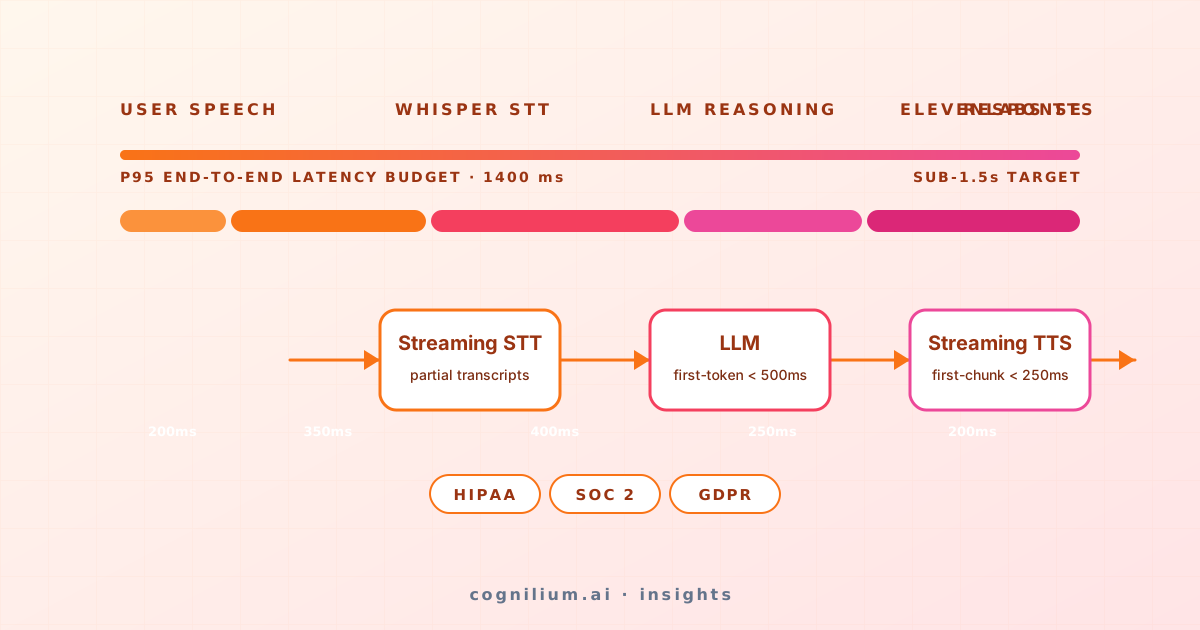
Architecture Diagram

Layer Responsibilities

LayerPurposeLatency Budget
TelephonyHandle calls, manage audio streams~50ms
STTConvert speech to text in real-time~150-300ms
ConversationUnderstand intent, generate response~200-500ms
TTSConvert response to natural speech~100-200ms
IntegrationsCRM updates, knowledge retrieval~50-100ms
TotalEnd-to-end response time~600-1200ms

2. Architecture Patterns

Pattern 1: Streaming (Lowest Latency)

User speaks → STT streams words → LLM starts generating → TTS streams audio
             (parallel processing, no waiting for complete sentences)

Latency: 400-600ms first word
Best for: Real-time conversations, sales calls
async def handle_call(audio_stream):
    async for transcript in deepgram.transcribe_stream(audio_stream):
        if transcript.is_final:
            response_stream = claude.stream(
                model="claude-3-haiku-20240307",
                messages=[{"role": "user", "content": transcript.text}]
            )
            
            async for chunk in response_stream:
                audio = await elevenlabs.stream_tts(chunk.text)
                yield audio

Pattern 2: Turn-Based (Simpler, Higher Latency)

User speaks → Wait for silence → STT complete → LLM → TTS complete → Play
             (sequential processing, waits for complete utterances)

Latency: 800-1500ms
Best for: Support calls, complex queries

Pattern 3: Hybrid (Best of Both)

User speaks → Streaming STT → Silence detected → LLM → Streaming TTS
             (stream input, batch process, stream output)

Latency: 500-800ms
Best for: Most enterprise use cases

Choosing a Pattern

FactorStreamingTurn-BasedHybrid
LatencyBestWorstGood
AccuracyLowerBestGood
Interruption handlingNaturalAwkwardGood
Implementation complexityHighLowMedium
CostHigherLowerMedium

3. Vendor Selection Guide

Speech-to-Text Comparison

VendorLatencyAccuracyStreamingPrice (per hour)
Deepgram150ms95%✅ Real-time$0.25
AssemblyAI200ms96%✅ Real-time$0.37
Whisper (OpenAI)500ms+97%❌ Batch only$0.36
Google STT200ms94%✅ Real-time$0.24
AWS Transcribe250ms93%✅ Real-time$0.24

Recommendation: Deepgram for production (best latency/cost), AssemblyAI for accuracy-critical.

Text-to-Speech Comparison

VendorLatencyQualityStreamingPrice (per 1M chars)
ElevenLabs100msExcellent$180
PlayHT150msExcellent$150
Amazon Polly50msGood$16
Azure TTS80msVery Good$15
Google TTS100msGood$16

Recommendation: ElevenLabs for natural voices, Polly for cost at scale.

Telephony Comparison

VendorGlobal CoverageReliabilityFeaturesPrice (per min)
TwilioExcellent99.95%Full$0.013
VonageGood99.9%Good$0.012
Amazon ConnectGood99.99%AWS-native$0.018
PlivoGood99.9%Basic$0.009

Recommendation: Twilio for features, Amazon Connect for AWS shops.

4. Latency Optimization

The Latency Budget

Target: <1 second end-to-end (user finishes speaking → AI starts responding)

Architecture Diagram

Optimization Techniques

1. Endpoint Selection

# Use regional endpoints for lowest latency
deepgram = Deepgram(api_key, endpoint="api-us-east-1.deepgram.com")
elevenlabs = ElevenLabs(api_key, region="us")

2. Connection Pooling

import aiohttp

async def create_session():
    connector = aiohttp.TCPConnector(
        limit=100,
        keepalive_timeout=60,
        enable_cleanup_closed=True
    )
    return aiohttp.ClientSession(connector=connector)

3. Parallel Processing

async def process_turn(transcript: str):
    llm_task = asyncio.create_task(generate_response(transcript))
    voice_task = asyncio.create_task(prepare_voice_session())
    
    response, voice_session = await asyncio.gather(llm_task, voice_task)
    return await stream_tts(response, voice_session)

4. Filler Phrases

FILLERS = [
    "Let me check that for you...",
    "One moment while I look that up...",
    "Great question, give me just a second..."
]

async def respond_with_filler(query: str):
    if estimated_complexity(query) > 0.7:
        yield await tts.synthesize(random.choice(FILLERS))
    
    async for chunk in generate_response(query):
        yield await tts.synthesize(chunk)

5. Knowledge Integration

Voice AI without knowledge is just a chatbot. Enterprise systems need:

RAG for Voice

class VoiceKnowledgeBase:
    def __init__(self, retriever, llm):
        self.retriever = retriever
        self.llm = llm
    
    async def answer(self, query: str, conversation_history: list) -> str:
        docs = await self.retriever.search(query, top_k=5)
        context = "\n".join([d["content"] for d in docs])
        
        prompt = f"""You are a helpful voice assistant. Answer concisely for spoken delivery.
        
Context from knowledge base:
{context}

User: {query}

Respond in 1-3 sentences, natural for speech:"""

        return await self.llm.generate(prompt)

Tool Integration

TOOLS = [
    {
        "name": "check_order_status",
        "description": "Check the status of a customer order",
        "parameters": {"order_id": "string"}
    },
    {
        "name": "schedule_appointment",
        "description": "Book an appointment in the calendar",
        "parameters": {"date": "string", "time": "string", "type": "string"}
    },
    {
        "name": "transfer_to_human",
        "description": "Transfer the call to a human agent",
        "parameters": {"department": "string", "reason": "string"}
    }
]

6. Production Deployment

Infrastructure

Architecture Diagram

Scaling Considerations

ComponentScaling Strategy
Voice workersHorizontal (1 worker = ~100 concurrent calls)
STTManaged service (scales automatically)
LLMAPI rate limits (request queuing)
TTSManaged service (scales automatically)
RecordingsS3 with lifecycle policies

Monitoring

METRICS = {
    "latency": {
        "stt_p50": "< 200ms",
        "llm_first_token_p50": "< 300ms",
        "tts_first_chunk_p50": "< 150ms",
        "end_to_end_p50": "< 800ms"
    },
    "quality": {
        "stt_accuracy": "> 95%",
        "resolution_rate": "> 80%",
        "csat": "> 4.0/5"
    },
    "operations": {
        "concurrent_calls": "current / max",
        "call_drop_rate": "< 1%",
        "api_error_rate": "< 0.1%"
    }
}

7. Metrics That Matter

Key Performance Indicators

MetricDefinitionTarget
Connect Rate% of calls that reach a person> 40% (outbound)
Resolution Rate% of calls resolved without escalation> 80%
First-Call Resolution% resolved on first attempt> 85%
Average Handle TimeDuration of successful calls< 3 min
CSATCustomer satisfaction score> 4.0/5
Cost per InteractionTotal cost / interactions< $0.50

Calculating ROI

Monthly human agent cost:
- 10 agents × $4,000/month = $40,000
- Handle 5,000 calls/month
- Cost per call: $8.00

Voice AI cost:
- Infrastructure: $2,000/month
- API costs: $3,000/month (STT + LLM + TTS)
- Handle 5,000 calls/month
- Cost per call: $1.00

Savings: $7.00/call × 5,000 calls = $35,000/month
ROI: 700%

8. Real Implementations

ProspectVox: Outbound Sales

At Cognilium, we built ProspectVox for automated sales outreach.

Architecture:

  • Twilio for telephony
  • Deepgram for STT (150ms latency)
  • Claude 3 Haiku for conversation (fast, cost-effective)
  • ElevenLabs for natural voices

Results:

MetricBefore (Human)After (ProspectVox)
Connect rate32%47%
Calls per day80/agent2,000
Cost per qualified lead$45$12
Conversion to meeting8%12%

VORTA: Enterprise Support

VORTA combines voice AI with enterprise knowledge search.

Architecture:

  • Amazon Connect for telephony
  • AssemblyAI for STT (higher accuracy for technical terms)
  • Claude 3 Sonnet for complex reasoning
  • GraphRAG for knowledge retrieval
  • Azure TTS for enterprise voice

Results:

MetricBeforeAfter (VORTA)
First-call resolution64%92%
Average handle time8.5 min3.2 min
CSAT3.4/54.6/5
Escalation rate36%8%

9. Common Mistakes

Mistake 1: Ignoring Latency

❌ Bad: "It takes 3 seconds to respond, but the answer is great!"
   User experience: Feels like talking to a broken robot

✅ Good: Optimize for <1 second first, then improve quality
   User experience: Natural conversation flow

Mistake 2: No Interruption Handling

# ❌ Bad: Ignore user interruptions
async def respond(text):
    full_response = await llm.generate(text)
    await tts.speak(full_response)  # User can't interrupt

# ✅ Good: Handle interruptions gracefully
async def respond_with_interruption(text):
    async for chunk in llm.stream(text):
        if await check_user_speaking():
            await stop_audio()
            return await handle_interruption()
        await tts.stream(chunk)

Mistake 3: No Fallback Strategy

# ❌ Bad: Crash when service fails
response = await llm.generate(query)

# ✅ Good: Graceful degradation
try:
    response = await asyncio.wait_for(llm.generate(query), timeout=3.0)
except asyncio.TimeoutError:
    response = "I'm having trouble processing that. Let me transfer you."
    await transfer_to_human()

Mistake 4: Ignoring Audio Quality

❌ Bad: Use any microphone input as-is
   Result: STT accuracy drops to 70%

✅ Good: Audio preprocessing
   - Noise cancellation
   - Echo removal
   - Automatic gain control
   - VAD (Voice Activity Detection)

10. Getting Started

Quick Start: 2 Hours to First Voice Agent

Prerequisites:

  • Twilio account
  • Deepgram API key
  • Anthropic API key
  • ElevenLabs API key

Step 1: Set Up Twilio Webhook

from flask import Flask, Response
from twilio.twiml.voice_response import VoiceResponse, Connect

app = Flask(__name__)

@app.route("/voice", methods=["POST"])
def voice():
    response = VoiceResponse()
    connect = Connect()
    connect.stream(url="wss://your-server.com/stream")
    response.append(connect)
    return Response(str(response), mimetype="text/xml")

Step 2: Handle WebSocket Stream

import websockets
import asyncio

async def handle_stream(websocket):
    async for message in websocket:
        data = json.loads(message)
        
        if data["event"] == "media":
            audio = base64.b64decode(data["media"]["payload"])
            transcript = await stt.transcribe(audio)
            
            if transcript:
                response = await llm.generate(transcript)
                audio_response = await tts.synthesize(response)
                await websocket.send(json.dumps({
                    "event": "media",
                    "media": {"payload": base64.b64encode(audio_response).decode()}
                }))

Next Steps

  1. Voice AI ROI Calculator → - Build the business case
  2. Twilio + ElevenLabs Integration → - Deep dive on voice quality
  3. Voice AI for Sales → - Outbound automation patterns
  4. Voice AI for Support → - 24/7 resolution strategies
  5. Voice AI Compliance → - Recording and consent

Need help building enterprise voice AI?

At Cognilium, we built ProspectVox (47% connect rate) and VORTA (92% FCR). Let's discuss your voice AI project →

Share this article

Muhammad Mudassir

Muhammad Mudassir

Founder & CEO, Cognilium AI

Mudassir Marwat is the Founder & CEO of Cognilium AI, where he leads the design and deployment of pr...

Frequently Asked Questions

Find answers to common questions about the topics covered in this article.

Still have questions?

Get in touch with our team for personalized assistance.

Contact Us